User Management
User management in EFP Allocations handles the complete lifecycle of user accounts within resource allocations, from creation through validation to deletion. This system provides hosting entities with flexible workflows to accommodate different validation requirements and account provisioning processes.
Overview
When users are added to an allocation, the system creates an OfferingUser record that tracks the account provisioning status through various states. This allows hosting entities to implement custom validation workflows while maintaining clear visibility into the account creation process.
User Account States
The user account lifecycle follows a finite state machine with the following states:
| State | Description |
|---|---|
CREATION_REQUESTED |
Initial state when user account creation is requested |
CREATING |
Account is being created by the hosting entity |
PENDING_ACCOUNT_LINKING |
Waiting for user to link their existing account |
PENDING_ADDITIONAL_VALIDATION |
Requires additional validation from hosting entity |
OK |
Account is active and ready to use |
DELETION_REQUESTED |
Account deletion has been requested |
DELETING |
Account is being deleted |
DELETED |
Account has been successfully deleted |
ERROR_CREATING |
An error occurred during account creation |
ERROR_DELETING |
An error occurred during account deletion |
State Transition Flow
stateDiagram-v2
    [*] --> CREATION_REQUESTED : Account requested

    CREATION_REQUESTED --> CREATING : begin_creating()
    CREATION_REQUESTED --> OK : set_ok()

    CREATING --> PENDING_ACCOUNT_LINKING : set_pending_account_linking()
    CREATING --> PENDING_ADDITIONAL_VALIDATION : set_pending_additional_validation()
    CREATING --> OK : set_ok()

    PENDING_ACCOUNT_LINKING --> OK : set_validation_complete()
    PENDING_ADDITIONAL_VALIDATION --> OK : set_validation_complete()

    OK --> DELETION_REQUESTED : request_deletion()

    DELETION_REQUESTED --> DELETING : set_deleting()
    DELETING --> DELETED : set_deleted()

    %% Error state transitions during creation flow
    CREATION_REQUESTED --> ERROR_CREATING : set_error_creating()
    CREATING --> ERROR_CREATING : set_error_creating()
    PENDING_ACCOUNT_LINKING --> ERROR_CREATING : set_error_creating()
    PENDING_ADDITIONAL_VALIDATION --> ERROR_CREATING : set_error_creating()

    %% Error state transitions during deletion flow
    DELETION_REQUESTED --> ERROR_DELETING : set_error_deleting()
    DELETING --> ERROR_DELETING : set_error_deleting()

    %% Recovery from error states
    ERROR_CREATING --> CREATING : begin_creating()
    ERROR_CREATING --> OK : set_ok()
    ERROR_CREATING --> PENDING_ACCOUNT_LINKING : set_pending_account_linking()
    ERROR_CREATING --> PENDING_ADDITIONAL_VALIDATION : set_pending_additional_validation()

    ERROR_DELETING --> DELETING : set_deleting()
    ERROR_DELETING --> OK : set_ok()
Service Provider Workflow
API Endpoints
All state transition operations require UPDATE_OFFERING_USER permission and are accessed via POST to the offering user endpoint.
Base URL: /api/marketplace-offering-users/{uuid}/
Standard Account Creation Workflow
1. Begin Account Creation
When a hosting entity is ready to start creating a user account:
POST /api/marketplace-offering-users/{uuid}/begin_creating/
Valid transitions from: CREATION_REQUESTED, ERROR_CREATING
This transitions the user from initial request state to active creation state.
2. Handle Additional Validation Requirements
If your hosting entity requires additional validation (identity verification, institutional affiliation, etc.):
POST /api/marketplace-offering-users/{uuid}/set_pending_additional_validation/
Content-Type: application/json

{
  "comment": "Please upload your identity verification documents",
  "comment_url": "https://portal.lumi.csc.fi/identity-verification"
}
Valid transitions from: CREATING, ERROR_CREATING
The comment field provides instructions to the user, while the optional comment_url can link to detailed instructions, forms, or validation portals.
3. Handle Account Linking
For users who already have existing accounts in your system:
POST /api/marketplace-offering-users/{uuid}/set_pending_account_linking/
Content-Type: application/json

{
  "comment": "Please link your existing LUMI account using your institutional credentials",
  "comment_url": "https://portal.lumi.csc.fi/account-linking"
}
Valid transitions from: CREATING, ERROR_CREATING
This allows users to connect their new allocation access to existing accounts in your identity management system.
4. Update User Instructions
You can update user instructions without changing the account state:
PATCH /api/marketplace-offering-users/{uuid}/update_comments/
Content-Type: application/json

{
  "service_provider_comment": "Documents received. Additional tax forms required for EU compliance.",
  "service_provider_comment_url": "https://portal.lumi.csc.fi/tax-forms"
}
Valid states: All states except DELETED
This is useful for providing status updates or additional instructions during validation processes.
5. Complete Account Creation
When validation is complete and the account is ready:
POST /api/marketplace-offering-users/{uuid}/set_validation_complete/
Valid transitions from: PENDING_ADDITIONAL_VALIDATION, PENDING_ACCOUNT_LINKING
This transitions the user to OK state and clears the comment fields. The user can now access resources.
Account Deletion Workflow
1. Request Deletion
Account deletion can be requested by: - System automatically - when all connections to active allocations are finished - Hosting Entity (HE) - to signal that they plan to remove the user account
POST /api/marketplace-offering-users/{uuid}/request_deletion/
Valid transitions from: OK
This moves the account to deletion requested state, triggering hosting entity processes.
2. Begin Deletion Process
When the hosting entity starts the deletion process:
POST /api/marketplace-offering-users/{uuid}/set_deleting/
Valid transitions from: DELETION_REQUESTED, ERROR_DELETING
This indicates that account deletion is actively in progress.
3. Complete Deletion
When the account has been successfully removed from all systems:
POST /api/marketplace-offering-users/{uuid}/set_deleted/
Valid transitions from: DELETING
This is the final state for successful account deletion.
Error Handling and Recovery
Creation Errors
If account creation fails:
POST /api/marketplace-offering-users/{uuid}/set_error_creating/
Valid transitions from: CREATION_REQUESTED, CREATING, PENDING_ACCOUNT_LINKING, PENDING_ADDITIONAL_VALIDATION
To retry after fixing issues:
POST /api/marketplace-offering-users/{uuid}/begin_creating/
Deletion Errors
If account deletion fails:
POST /api/marketplace-offering-users/{uuid}/set_error_deleting/
Valid transitions from: DELETION_REQUESTED, DELETING
To retry deletion:
POST /api/marketplace-offering-users/{uuid}/set_deleting/
Practical Workflow Examples
Example 1: Standard HPC Account Creation
# 1. Start account creation process
curl -X POST \
  "https://efp-allocations.example.com/api/marketplace-offering-users/abc123/begin_creating/" \
  -H "Authorization: Token your-api-token"

# 2. Require institutional verification
curl -X POST \
  "https://efp-allocations.example.com/api/marketplace-offering-users/abc123/set_pending_additional_validation/" \
  -H "Content-Type: application/json" \
  -H "Authorization: Token your-api-token" \
  -d '{
    "comment": "Please verify your institutional affiliation",
    "comment_url": "https://portal.lumi.csc.fi/verify-affiliation"
  }'

# 3. Update with additional requirements
curl -X PATCH \
  "https://efp-allocations.example.com/api/marketplace-offering-users/abc123/update_comments/" \
  -H "Content-Type: application/json" \
  -H "Authorization: Token your-api-token" \
  -d '{
    "service_provider_comment": "Affiliation verified. Please complete training modules.",
    "service_provider_comment_url": "https://training.lumi.csc.fi/hpc-basics"
  }'

# 4. Complete account creation
curl -X POST \
  "https://efp-allocations.example.com/api/marketplace-offering-users/abc123/set_validation_complete/" \
  -H "Authorization: Token your-api-token"
Example 2: Cloud Service Account Linking
# 1. Start creation process
curl -X POST \
  "https://efp-allocations.example.com/api/marketplace-offering-users/def456/begin_creating/" \
  -H "Authorization: Token your-api-token"

# 2. Request account linking for existing users
curl -X POST \
  "https://efp-allocations.example.com/api/marketplace-offering-users/def456/set_pending_account_linking/" \
  -H "Content-Type: application/json" \
  -H "Authorization: Token your-api-token" \
  -d '{
    "comment": "Link your existing cloud account or create new credentials",
    "comment_url": "https://cloud.csc.fi/account-management"
  }'

# 3. Complete linking process
curl -X POST \
  "https://efp-allocations.example.com/api/marketplace-offering-users/def456/set_validation_complete/" \
  -H "Authorization: Token your-api-token"
User Management and Monitoring
Filtering and Querying Users
Filter by State
Get users requiring hosting entity attention:
# Users needing validation
GET /api/marketplace-offering-users/?state=Pending%20additional%20validation

# Users with creation errors
GET /api/marketplace-offering-users/?state=Error%20creating

# Active accounts
GET /api/marketplace-offering-users/?state=OK

# Multiple states
GET /api/marketplace-offering-users/?state=Pending%20additional%20validation&state=Pending%20account%20linking
Filter by Provider and Offering
# All users for your hosting entity
GET /api/marketplace-offering-users/?provider_uuid=your-he-uuid

# Users for specific compute offering
GET /api/marketplace-offering-users/?offering_uuid=compute-offering-uuid&state=Creating

# Recently created accounts
GET /api/marketplace-offering-users/?created_after=2024-01-01&state=OK
Setting external (local) username via API
Hosting entities are expected to push back the local username to EFP Allocations after successful user creation at the hosting site. This can be done via an API call:
# User update
PUT /api/marketplace-offering-users/a1b2c3d4-e5f6-7890-abcd-ef1234567890/
More information about pushing back local username and examples can be found on Waldur documentation.
State Filter Values
| Filter Value | State | Description |
|---|---|---|
Requested |
CREATION_REQUESTED |
Users with account creation requested |
Creating |
CREATING |
Users whose accounts are being created |
Pending account linking |
PENDING_ACCOUNT_LINKING |
Users waiting to link existing accounts |
Pending additional validation |
PENDING_ADDITIONAL_VALIDATION |
Users requiring additional validation |
OK |
OK |
Users with active, ready-to-use accounts |
Requested deletion |
DELETION_REQUESTED |
Users with deletion requested |
Deleting |
DELETING |
Users whose accounts are being deleted |
Deleted |
DELETED |
Users with successfully deleted accounts |
Error creating |
ERROR_CREATING |
Users with errors during account creation |
Error deleting |
ERROR_DELETING |
Users with errors during account deletion |
Operational Monitoring
Daily Operations Dashboard
# Check users requiring immediate attention
curl -G "https://efp-allocations.example.com/api/marketplace-offering-users/" \
  --data-urlencode "provider_uuid=your-he-uuid" \
  --data-urlencode "state=Pending additional validation" \
  --data-urlencode "state=Pending account linking" \
  --data-urlencode "state=Error creating" \
  -H "Authorization: Token your-api-token"

# Monitor active account creation processes
curl -G "https://efp-allocations.example.com/api/marketplace-offering-users/" \
  --data-urlencode "provider_uuid=your-he-uuid" \
  --data-urlencode "state=Creating" \
  -H "Authorization: Token your-api-token"
Error Resolution
# Find accounts in error states
curl -G "https://efp-allocations.example.com/api/marketplace-offering-users/" \
  --data-urlencode "provider_uuid=your-he-uuid" \
  --data-urlencode "state=Error creating" \
  --data-urlencode "state=Error deleting" \
  -H "Authorization: Token your-api-token"
Response Fields
When retrieving OfferingUser objects, key fields include:
uuid: Unique identifier for the user accountstate: Current lifecycle stateuser: User details (name, email, username)offering: Associated allocation offeringusername: Local account identifier (if assigned)service_provider_comment: Instructions or status from hosting entityservice_provider_comment_url: Link to additional resourcescreated: Account creation timestampmodified: Last modification timestamp
Integration Considerations
Automated Workflows
Many hosting entities implement automated account creation where possible:
# Example: Automated account creation for verified users
def process_user_creation_request(offering_user):
    # Start creation process
    offering_user.begin_creating()

    # Check if user requires additional validation
    if requires_institutional_verification(offering_user.user):
        offering_user.set_pending_additional_validation(
            comment="Please verify institutional affiliation",
            comment_url="https://portal.lumi.csc.fi/verify"
        )
    else:
        # Create local account and complete
        create_local_account(offering_user)
        offering_user.set_ok()
Error Handling Strategies
Implement robust error handling and retry mechanisms:
def handle_account_creation_error(offering_user, error):
    # Log error details
    logger.error(f"Account creation failed for {offering_user.uuid}: {error}")

    # Set error state
    offering_user.set_error_creating()

    # Schedule retry with exponential backoff
    schedule_retry(offering_user, delay=calculate_backoff_delay())
User management in EFP Allocations GUI
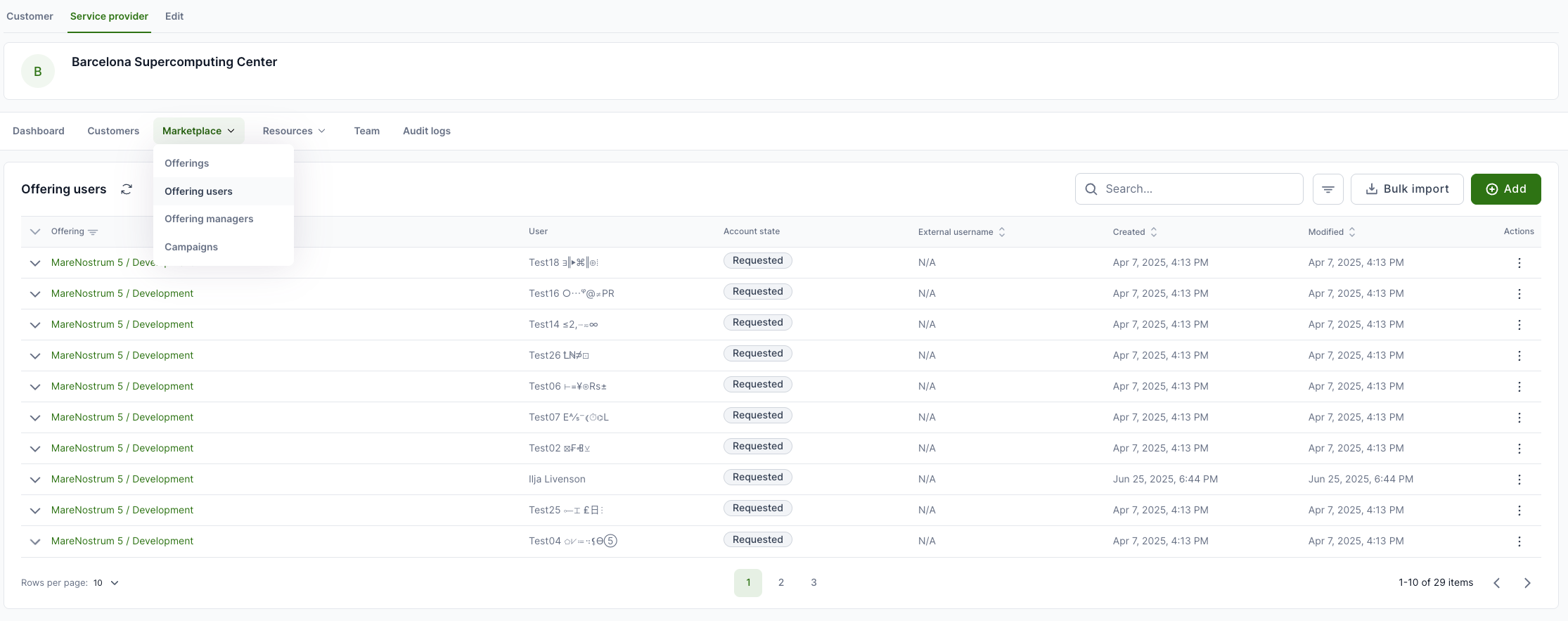
List of all offerings' users
To see the list of all offering users, open the Service provider tab and then from the workspace menu, select Marketplace → Offering users.
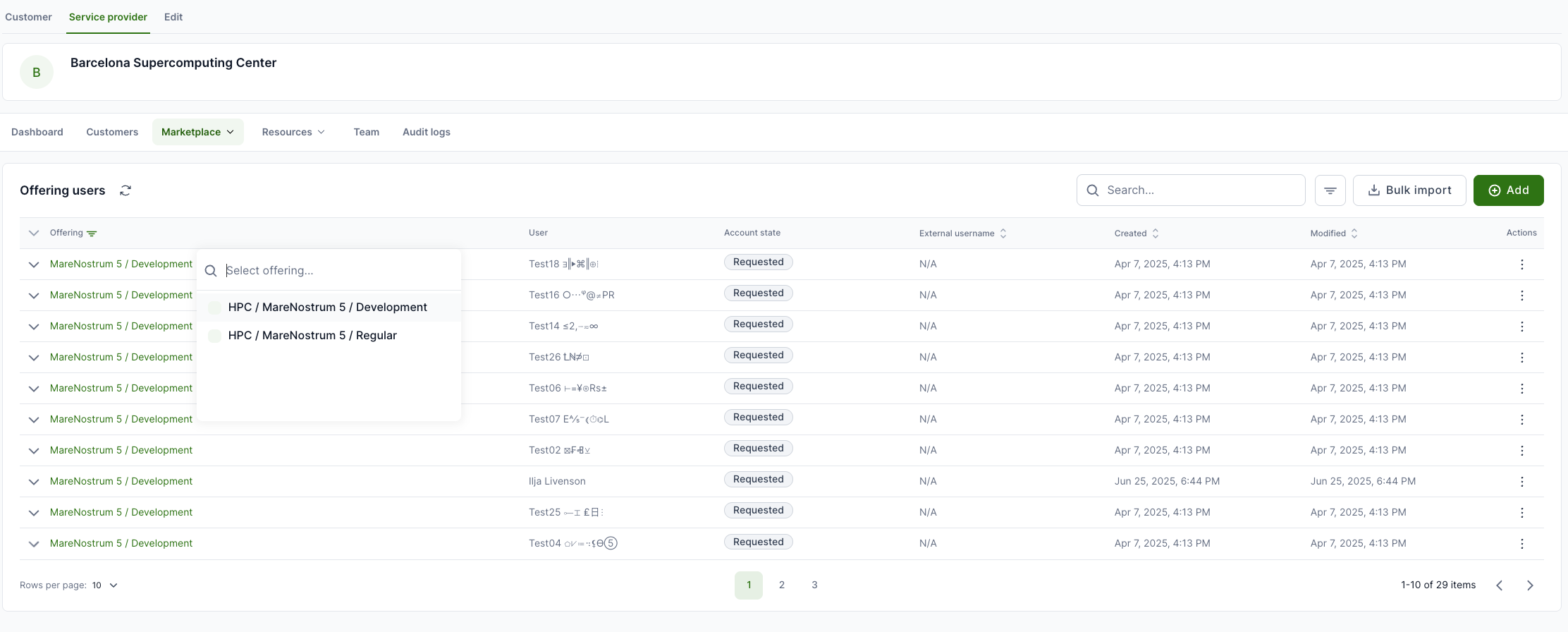
Filtering offering users
Same view allows to set filters. For example, if you wish to see specific offering users.
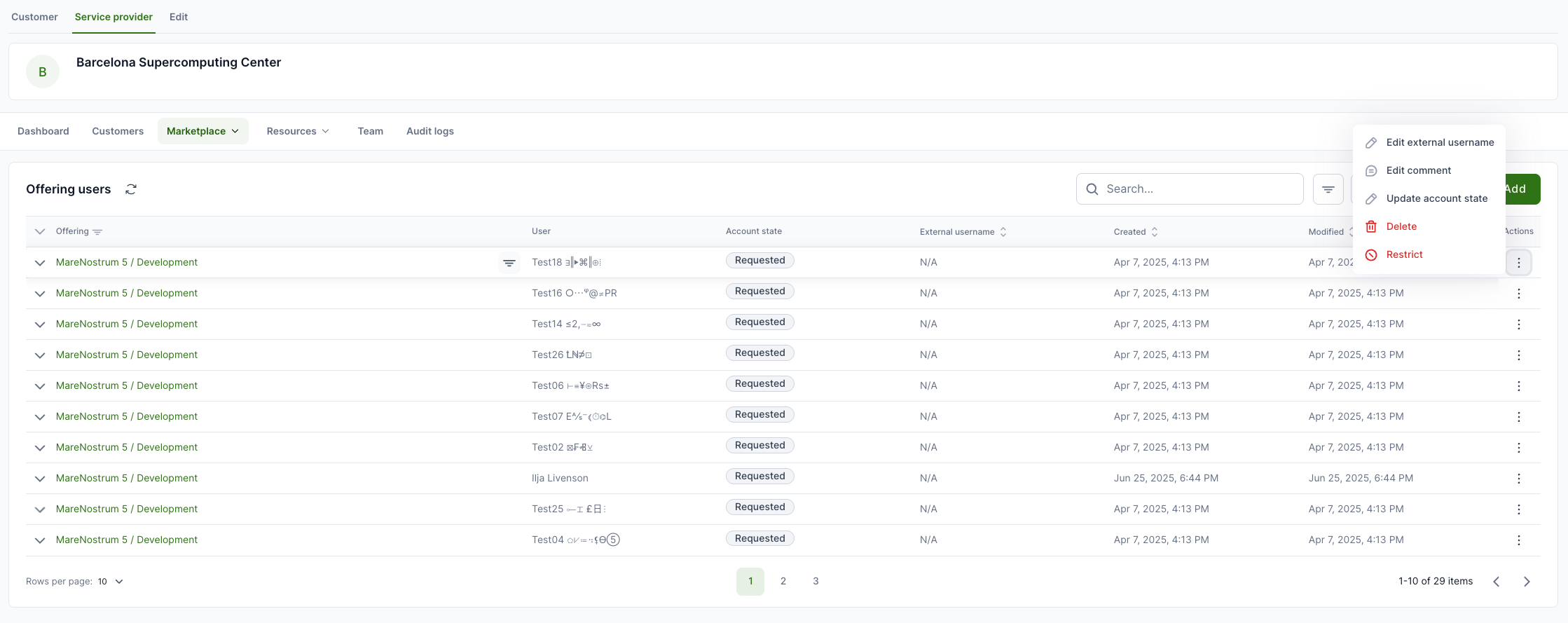
Setting external username for offering user
To set an external username for the offering user or change the status, then at the end of the line, click on the Actions (three dots) and select Edit external username or Update account state. Also, it is possible to add a comment for specific user (e.g. additional validation needed).